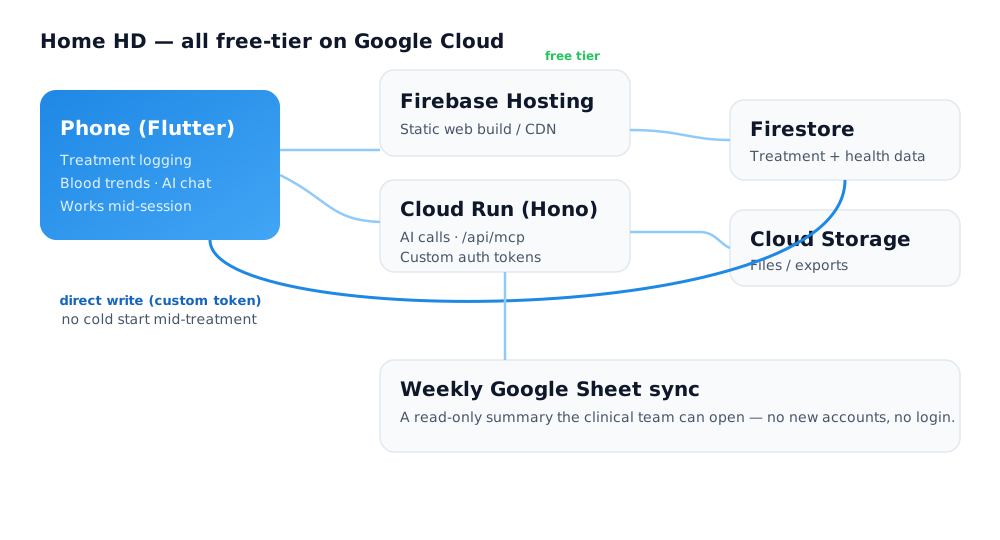
I built this for myself, on my own time, with no intention of paying a monthly bill to keep my own health data alive. So the whole system runs on Google Cloud free tiers — not "cheap," actually £0. The pieces fit like this:
- Firebase Hosting serves the web build.
- Cloud Run runs a small Hono server for the AI calls and the
/api/mcpendpoint. - Firestore holds the treatment and health data.
- Cloud Storage holds files and exports.
- A weekly Google Sheet sync gives the clinical team a read-only summary — no new app, no login.
The moment that must never stall
Free tiers have one sharp edge: Cloud Run scales to zero, so when it wakes it cold-starts. A few seconds of "please wait" is fine for a chat reply. It is not fine when I'm mid-treatment, hooked up, trying to save a reading before I forget it. That scenario is the whole reason the app exists — it can't be the one place it fails.
So the write path that has to be instant skips the server entirely: treatment data is written client-side, straight to Firestore, with a custom auth token. No Cloud Run in the loop. The server only handles the things that can tolerate a pause — the AI, the exports. The critical path got its own route, on purpose.
The transferable idea
Don't put your whole app behind one tier of infrastructure. Find the one path that must never stall, and architect that path for it — even if it takes a different route than everything else. Free tiers are generous if you respect where their sharp edges are.
Designing cloud architecture that's both cheap and dependable — knowing which corners are safe to cut and which aren't — is a big part of what I do at twentytwotensors. Get in touch if that's useful.